
Flight Following is a safety feature in PilotDuty designed to automatically share your flight status with a designated person or system. This ensures someone is always aware of your flight activity in case of emergency or delay.
There are two types of Flight Following available:
💬 1. SMS Flight Following #
When enabled, this feature automatically sends SMS messages to a flight-following contact at key moments of your flight.
How it works: #
- Takeoff: An SMS is sent when you take off.
- Landing: Once you land and your aircraft has been parked for more than the “Parking Time Limit,” the app notifies you to confirm and send a landing SMS.
Setup Instructions: #
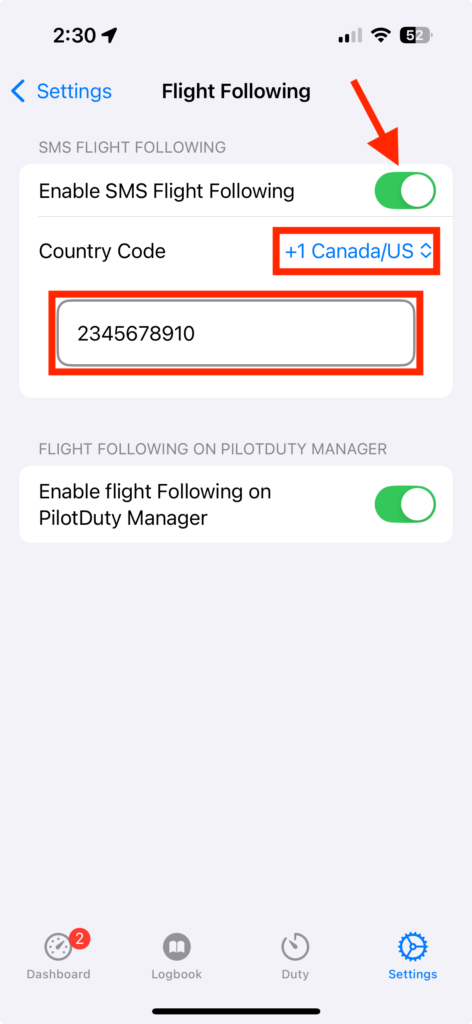
- Open the Settings tab in the app.
- Tap Flight Following.
- Enable SMS Flight Following.
- Enter the Country Code and the Mobile Number of the person responsible for tracking your flight.
📌 SMS on Take Off Example : John Dow took off from CYQB at 2025-02-28 10:42 GMT -5 with C-FFFF.
📌 SMS on Landing Example : John Dow landed at CYBG at 2025-02-28 11:42 GMT -5 with C-FFFF.
🖥️ 2. PilotDuty Manager Flight Following #
PilotDuty Manager is a web-based dashboard that allows flight operators to follow multiple aircraft in real-time.

How it works: #
When this option is enabled, the app automatically sends:
- Flight status: (onBlock, takeoff, landing, low speed maneuver, offBlock)
- Time of the event
- Aircraft identification
- Altitude and position
This data is shown live in the PilotDuty Manager interface with the status:
- OnBoarding
- In Flight
- On Ground
- Safe
This feature is perfect for operators managing multiple pilots or aircraft.
⚠️ Note: The PilotDuty application must be Signed In to PilotDuty Manager, see "Connect to PilotDuty Manager"
Setup Instructions: #
- Open the Settings tab in the app.
- Tap Flight Following.
- Enable Flight Following on PilotDuty Manager.

✅ Tips and Notes #
- Both SMS and Manager modes can be enabled at the same time.
- Make sure location permissions are set to Always and notifications are enabled.
- Make sure the aircraft call sign is capitalized, complete and identical on the PilotDuty app and PilotDuty Manager
- If the device loses signal during flight, data will be sent as soon as the connection is reestablished, if an error occurs, a notification will be displayed to the user.
🔐 Privacy & Safety #
- No personal information is shared publicly.
- All data sent to PilotDuty Manager is encrypted and secured.
Flight Following is designed to enhance your operational safety and peace of mind, whether you’re flying solo or as part of a team.

