Skip to content
  • PilotDuty – App
  • PilotDuty Manager
  • Resources
    • Features
    • Blog
    • docs
    • FAQ
    • Terms Of Use
    • Privacy Policy
    • Cookie Policy
  • Shop
    • Shop
    • Cart
    • My account
  • Contact

Archives

  • June 2025
  • May 2025
  • March 2025

Categories

  • Application
  • Case Study
  • Technology

How can we help you?

🚀 Getting Started With PilotDuty iOS APP

  • Understanding what does this view mean?
  • Initial configuration (OnBoarding)
  • How to Ensure PilotDuty Has the Required iOS Permissions for Background Flight Tracking

🔧Configurations of the PilotDuty iOS APP

  • Edit Pilot Profile
  • Add a Aircraft
  • Add a Work or Rest Area (PRO)
  • Set the Parking Time Limit
  • Setup of Flight Following
  • Connect to PilotDuty Manager
  • Setup Medical, License and Proficiency Validity (PRO)

👨‍✈️ Use of the PilotDuty iOS app

  • Understanding How the App Handle Event and Flight
  • Manually Adding an Event (Flight / Work / Rest)
  • Manually Adding Flight to an Event
  • Get a Summary of Your Personal Logbook
  • Export My Personal Logbook
  • How to Disapprove a Flight (Event)
  • Interpret duty time information (PRO)
  • Flight Following on PilotDuty Manager
View Categories
  • Home
  • Docs
  • iOS App
  • 🔧Configurations of the PilotDuty iOS APP
  • Set the Parking Time Limit

Set the Parking Time Limit

1 min read

🚀 Overview #

The Parking Time Limit is designed to avoid splitting a flight into multiple entries during short stops or touch-and-go maneuvers. It ensures that PilotDuty continues logging a single flight when the aircraft is briefly parked and quickly airborne again.


🔧 What is Parking Time Limit? #

The Parking Time Limit is a time threshold (in seconds) set by the user. It defines how long an aircraft can stay stopped before PilotDuty decides to end the current flight and start a new one.

• If the aircraft is parked less than the Parking Time Limit, the current flight continues.

• If the aircraft is parked longer than the Parking Time Limit, a new flight is created.

📌 Example: A parking time of 30 seconds means any stop shorter than that will not create a new flight.


touch And Go

In this example, the aircraft lands, briefly stops, and takes off again. If the stop duration is under the Parking Time Limit, it’s treated as one flight.


⚙️ How to Set the Parking Time Limit #

  1. Tap the Settings tab in PilotDuty.
  2. Go to General.
  3. Scroll down to Flight Overlap Threshold (in seconds).
  4. Enter your desired Parking Time Limit value.
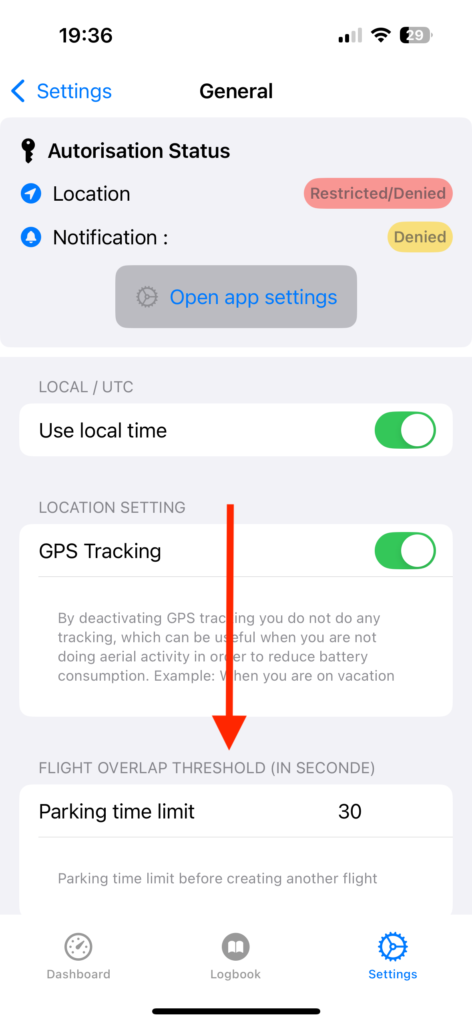
settings General Parking Time Limit

✅ Best Practices #

• For training circuits or touch-and-go exercises, increase the limit (e.g. 60 seconds).

• For commercial ops, keep the default (e.g. 30 seconds) to clearly separate flights.


📌 Note (PRO)

  • This setting only applies to flights detected in Aircraft Areas.
  • It does not affect Work or Rest Area event tracking.

  • 📚 Summary #

    Parking Time Limit gives you better control over how flights are logged during quick stops. Adjust it to match your flight activity and reduce the need for manual corrections in your logbook.

    What are your Feelings

    Share This Article :

    • Facebook
    • LinkedIn
    Still stuck? How can we help?

    How can we help?

    Updated on March 30, 2025
    Add a Work or Rest Area (PRO)Setup of Flight Following

    Leave a Reply Cancel reply

    Your email address will not be published. Required fields are marked *

    Table of Contents
    • 🚀 Overview
    • 🔧 What is Parking Time Limit?
    • ⚙️ How to Set the Parking Time Limit
    • ✅ Best Practices
    • 📚 Summary

    ABOUT PilotDuty


    PilotDuty® is the only fully automatic flight logbook for general aviation pilots — featuring iBeacon-based flight tracking, SMS flight following, and aircraft maintenance monitoring. Trusted by aviation professionals across North America.

    QUICK LINKS

    • PilotDuty – App
    • PilotDuty Manager
    • Contact Us
    • Shop

    CONTACT US

    Feel free to contact & reach us !

    Address : Mascouche, Qc Canada
    Email : support@pilotduty.com
    Phone : 1 (888) 969-2594

    RESOURCES

    • FAQ
    • Docs
    • Blog
    • Terms Of Use
    • Privacy Policy
    • Refund and Returns Policy
    • Cookie Policy
    Copyright © 2026 PilotDuty. Powered by M2D3V