Skip to content
  • PilotDuty โ€“ App
  • PilotDuty Manager
  • Resources
    • Features
    • Blog
    • docs
    • FAQ
    • Terms Of Use
    • Privacy Policy
    • Cookie Policy
  • Shop
    • Shop
    • Cart
    • My account
  • Contact

Archives

  • June 2025
  • May 2025
  • March 2025

Categories

  • Application
  • Case Study
  • Technology

How can we help you?

๐Ÿš€ Getting Started With PilotDuty iOS APP

  • Understanding what does this view mean?
  • Initial configuration (OnBoarding)
  • How to Ensure PilotDuty Has the Required iOS Permissions for Background Flight Tracking

๐Ÿ”งConfigurations of the PilotDuty iOS APP

  • Edit Pilot Profile
  • Add a Aircraft
  • Add a Work or Rest Area (PRO)
  • Set the Parking Time Limit
  • Setup of Flight Following
  • Connect to PilotDuty Manager
  • Setup Medical, License and Proficiency Validity (PRO)

๐Ÿ‘จโ€โœˆ๏ธ Use of the PilotDuty iOS app

  • Understanding How the App Handle Event and Flight
  • Manually Adding an Event (Flight / Work / Rest)
  • Manually Adding Flight to an Event
  • Get a Summary of Your Personal Logbook
  • Export My Personal Logbook
  • How to Disapprove a Flight (Event)
  • Interpret duty time information (PRO)
  • Flight Following on PilotDuty Manager
View Categories
  • Home
  • Docs
  • iOS App
  • ๐Ÿ‘จโ€โœˆ๏ธ Use of the PilotDuty iOS app
  • Interpret duty time information (PRO)

Interpret duty time information (PRO)

1 min read

This guide explains how to interpret flight duty (FT), work duty (ST), and rest time using the different views provided in the PilotDuty app.

Understanding duty time is crucial for pilots to maintain compliance and manage their schedules effectively, ensuring they adhere to proper duty time regulations.

โš ๏ธ Important #

PilotDuty is a tool to assist aviation companies and pilots but is not a regulatory reference. Always verify official regulations to ensure your compliance.


๐Ÿ“… Time Range Views #

24h / 7d / 28/30d / 90d / 365d: Choose timeframes to view cumulative duty, flight, and rest summaries.

Each time range applies to your total Flight Time (FT), Service Time (ST), and mandatory Rest.

duty time

๐ŸŸข Green โ€“ Rest Periods #

When you see green entries, it indicates periods of rest.

  • โ€œDay Offโ€ labels show rest day.
  • the green rectangle with tiered represent a rest period

๐Ÿ”ต Blue โ€“ Flight Time (FT) #

Flight time (FT) is counted when the aircraft moves under its own power with intent for flight:

  • Seen in blue on the right chart margin.
  • Helps verify limits with Flight Limit Warning .

โšซ๏ธ Grey โ€“ Work Time (ST) #

Work/Service Time (WST) includes all tasks except flights such as:

  • Planning
  • Reporting
  • Any other task

๐ŸŸ  Orange โ€“ Flight Limit Warning (FLmt) #

  • The orange zone indicates the flight time limit according to the chosen range.

๐Ÿ”ด Red โ€“ Service Limit Exceeded (SLmt) #

  • A red zone indicates the service time limit for this time slot, this limit evolves according to Canadian rules, for example: the start time of the first flight service.

interpretation color

๐Ÿšจ Mandatory Days Off #

If regulatory limits are exceeded, PilotDuty will automatically:

  • Mark mandatory days off with grey labels.
  • Show reasons (e.g., “Mandatory Day Off for 60h Week”)

mandatory day off duty

๐Ÿ“ƒ Informational Rules #

Tapping the (i) icon explains duty requirements such as:

  • 120h free from duty within 30 days
  • No more than 24h work in any 48h
  • Minimum 5 consecutive local nights of rest
  • …

warn day off duty

๐Ÿ”ด Colored Counters #

Each event card has a red badge:

  • Number of flights grouped in the duty period
  • Helps track active periods quickly

Example Use Case

Letโ€™s say:

  • On August 25, you worked 7.8 hours and completed 2 flights.

monthly duty

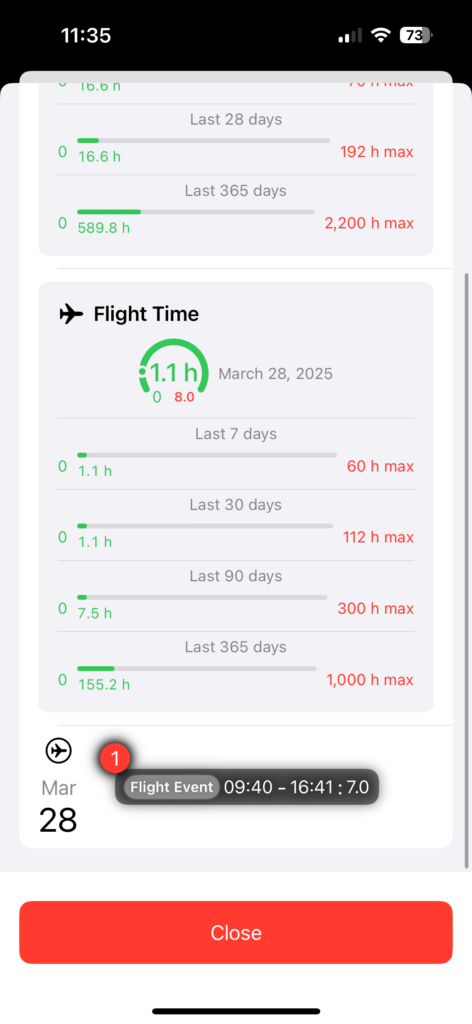
๐Ÿ” 5. Duty Event Detail View #

Tap on a day to access a detailed breakdown:

  • Service time dial (limit: 13.0 h -> variable)
  • Flight Time Dial (limit: 8.0 h -> variable)
  • Summaries for the last 7, 30, 90, and 365 days.
  • Event List (start/end times and total).
duty detail view down

โŒ Unapprove option: #

  • Swipe left to unapprove an event for editing in the dashboard tab.
duty detail view unapprove

Summary #

This view is your real-time assistant to stay under regulatory limits and detect potential fatigue issues. But again:

โš ๏ธ Disclaimer #

Always confirm with your Chief Pilot, manual or the applicable CARs/FARs. PilotDuty is only a support tool.

What are your Feelings

Share This Article :

  • Facebook
  • LinkedIn
Still stuck? How can we help?

How can we help?

Updated on June 12, 2025
How to Disapprove a Flight (Event)Flight Following on PilotDuty Manager

Leave a Reply Cancel reply

Your email address will not be published. Required fields are marked *

Table of Contents
  • โš ๏ธ Important
  • ๐Ÿ“… Time Range Views
  • ๐ŸŸข Green โ€“ Rest Periods
  • ๐Ÿ”ต Blue โ€“ Flight Time (FT)
  • โšซ๏ธ Grey โ€“ Work Time (ST)
  • ๐ŸŸ  Orange โ€“ Flight Limit Warning (FLmt)
  • ๐Ÿ”ด Red โ€“ Service Limit Exceeded (SLmt)
  • ๐Ÿšจ Mandatory Days Off
  • ๐Ÿ“ƒ Informational Rules
  • ๐Ÿ”ด Colored Counters
  • ๐Ÿ”ย 5. Duty Event Detail View
  • โŒ Unapprove option:
  • Summary
  • โš ๏ธ Disclaimer

ABOUT PilotDuty


PilotDutyยฎ is the only fully automatic flight logbook for general aviation pilots โ€” featuring iBeacon-based flight tracking, SMS flight following, and aircraft maintenance monitoring. Trusted by aviation professionals across North America.

QUICK LINKS

  • PilotDuty โ€“ App
  • PilotDuty Manager
  • Contact Us
  • Shop

CONTACT US

Feel free to contact & reach us !

Address : Mascouche, Qc Canada
Email :ย support@pilotduty.com
Phone : 1 (888) 969-2594

RESOURCES

  • FAQ
  • Docs
  • Blog
  • Terms Of Use
  • Privacy Policy
  • Refund and Returns Policy
  • Cookie Policy
Copyright ยฉ 2026 PilotDuty. Powered by M2D3V