Skip to content
  • PilotDuty – App
  • PilotDuty Manager
  • Resources
    • Features
    • Blog
    • docs
    • FAQ
    • Terms Of Use
    • Privacy Policy
    • Cookie Policy
  • Shop
    • Shop
    • Cart
    • My account
  • Contact

Archives

  • June 2025
  • May 2025
  • March 2025

Categories

  • Application
  • Case Study
  • Technology

How can we help you?

🚀 Getting Started With PilotDuty iOS APP

  • Understanding what does this view mean?
  • Initial configuration (OnBoarding)
  • How to Ensure PilotDuty Has the Required iOS Permissions for Background Flight Tracking

🔧Configurations of the PilotDuty iOS APP

  • Edit Pilot Profile
  • Add a Aircraft
  • Add a Work or Rest Area (PRO)
  • Set the Parking Time Limit
  • Setup of Flight Following
  • Connect to PilotDuty Manager
  • Setup Medical, License and Proficiency Validity (PRO)

👨‍✈️ Use of the PilotDuty iOS app

  • Understanding How the App Handle Event and Flight
  • Manually Adding an Event (Flight / Work / Rest)
  • Manually Adding Flight to an Event
  • Get a Summary of Your Personal Logbook
  • Export My Personal Logbook
  • How to Disapprove a Flight (Event)
  • Interpret duty time information (PRO)
  • Flight Following on PilotDuty Manager
View Categories
  • Home
  • Docs
  • iOS App
  • 🔧Configurations of the PilotDuty iOS APP
  • Connect to PilotDuty Manager

Connect to PilotDuty Manager

1 min read

Introduction #

Connecting to an organization allows PilotDuty to share your duty and flight tracking events with your team. This is especially useful for operators who want real-time monitoring of flight activities using PilotDuty Manager, or for aircraft owners and groups who want to track flight time for maintenance purposes.


Step 1 — Access PilotDuty Manager #

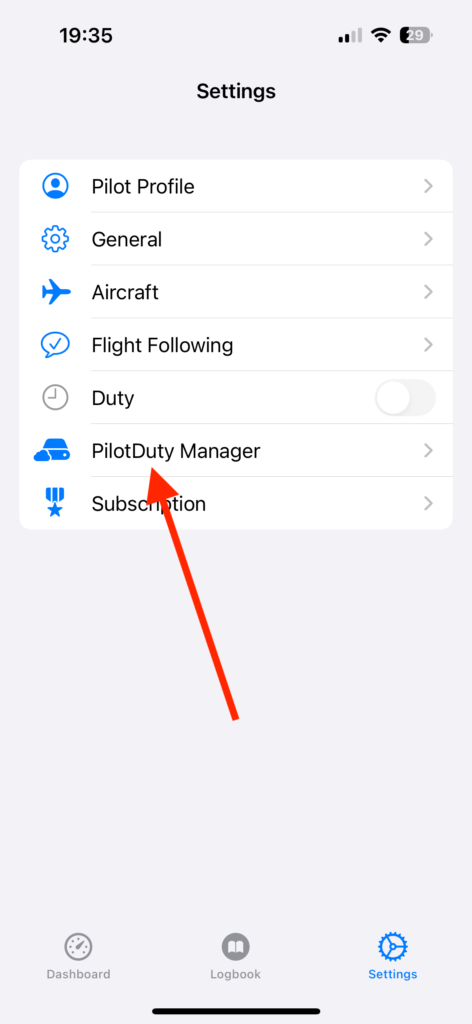
Open the app and go to:

  • Settings (bottom right)
  • Tap on PilotDuty Manager
settings Tab PDM

Step 2 — Sign in to PilotDuty Manager #

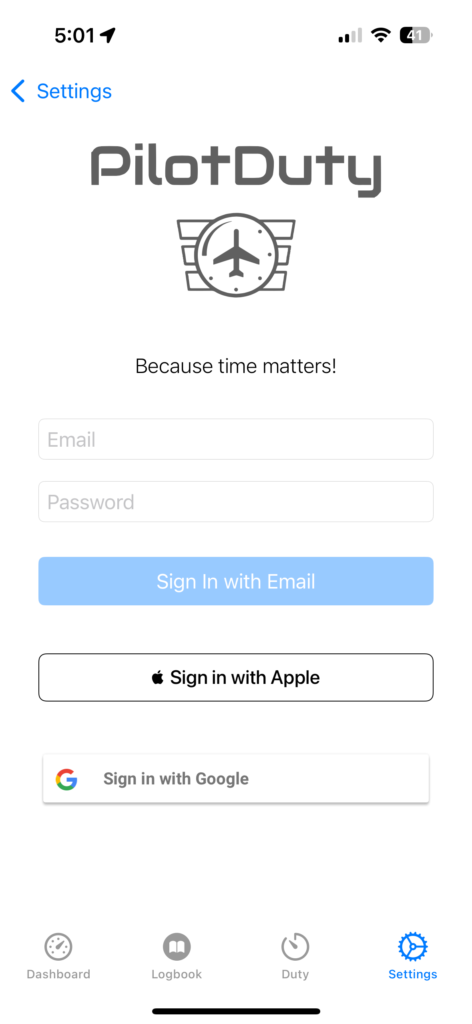
If you’ve completed the onboarding process, you should already have a PilotDuty Manager account.

If you’re not signed in yet, use the same method you used during onboarding:

You can sign in with:

  • Email + Password
  • Apple Sign-In
  • Google Sign-In
🆕 If you don’t have an account yet, you can create one directly at
PilotDuty Manager
setting SignIn PDM

Step 3 — Manage Sign In – Sign Out #

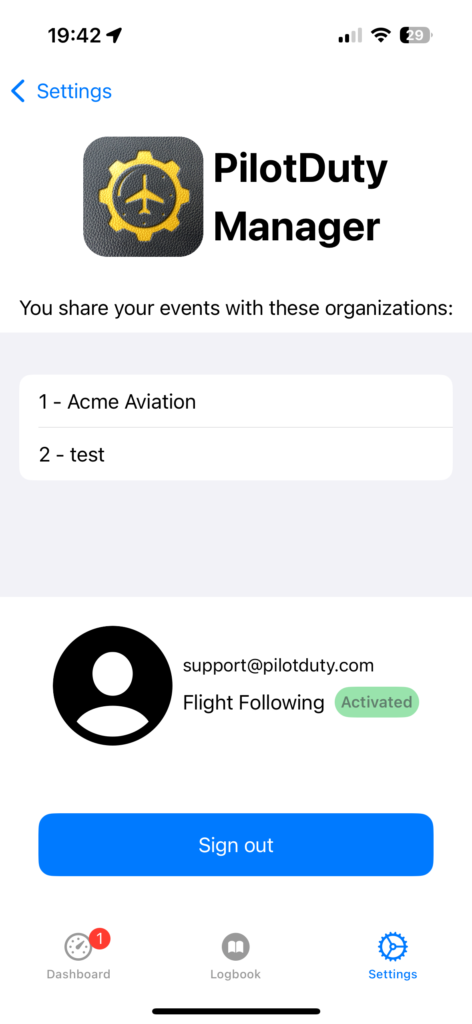
In this section, you’ll see a list of the organizations you’re connected to, such as example :

  • Acme Aviation
  • test

When connected, your flight and duty events are automatically shared with the organizations in real-time.

Flight Following Status

Your connection status will appear as:

  • ✅ Activated (green badge) if sharing is enabled
  • ❌ Disabled if no sharing is active
settings Database

📌 Notes #

  • You must have Flight Following enabled to share flights with an organization.
  • You must be Signed In to synchronize your flight events (work and rest)*Pro
  • Only the organization admin can view your data inside PilotDuty Manager.
  • Data is synced securely and updated in real-time.

What are your Feelings

Share This Article :

  • Facebook
  • LinkedIn
Still stuck? How can we help?

How can we help?

Updated on March 30, 2025
Setup of Flight FollowingSetup Medical, License and Proficiency Validity (PRO)

Leave a Reply Cancel reply

Your email address will not be published. Required fields are marked *

Table of Contents
  • Introduction
  • Step 1 — Access PilotDuty Manager
  • Step 2 — Sign in to PilotDuty Manager
  • Step 3 — Manage Sign In - Sign Out
  • 📌 Notes

ABOUT PilotDuty


PilotDuty® is the only fully automatic flight logbook for general aviation pilots — featuring iBeacon-based flight tracking, SMS flight following, and aircraft maintenance monitoring. Trusted by aviation professionals across North America.

QUICK LINKS

  • PilotDuty – App
  • PilotDuty Manager
  • Contact Us
  • Shop

CONTACT US

Feel free to contact & reach us !

Address : Mascouche, Qc Canada
Email : support@pilotduty.com
Phone : 1 (888) 969-2594

RESOURCES

  • FAQ
  • Docs
  • Blog
  • Terms Of Use
  • Privacy Policy
  • Refund and Returns Policy
  • Cookie Policy
Copyright © 2026 PilotDuty. Powered by M2D3V