Skip to content
  • PilotDuty – App
  • PilotDuty Manager
  • Resources
    • Features
    • Blog
    • docs
    • FAQ
    • Terms Of Use
    • Privacy Policy
    • Cookie Policy
  • Shop
    • Shop
    • Cart
    • My account
  • Contact

Archives

  • June 2025
  • May 2025
  • March 2025

Categories

  • Application
  • Case Study
  • Technology

How can we help you?

🚀 Getting Started With PilotDuty iOS APP

  • Understanding what does this view mean?
  • Initial configuration (OnBoarding)
  • How to Ensure PilotDuty Has the Required iOS Permissions for Background Flight Tracking

🔧Configurations of the PilotDuty iOS APP

  • Edit Pilot Profile
  • Add a Aircraft
  • Add a Work or Rest Area (PRO)
  • Set the Parking Time Limit
  • Setup of Flight Following
  • Connect to PilotDuty Manager
  • Setup Medical, License and Proficiency Validity (PRO)

👨‍✈️ Use of the PilotDuty iOS app

  • Understanding How the App Handle Event and Flight
  • Manually Adding an Event (Flight / Work / Rest)
  • Manually Adding Flight to an Event
  • Get a Summary of Your Personal Logbook
  • Export My Personal Logbook
  • How to Disapprove a Flight (Event)
  • Interpret duty time information (PRO)
  • Flight Following on PilotDuty Manager
View Categories
  • Home
  • Docs
  • iOS App
  • 🔧Configurations of the PilotDuty iOS APP
  • Setup of Flight Following

Setup of Flight Following

1 min read

Flight Following is a safety feature in PilotDuty designed to automatically share your flight status with a designated person or system. This ensures someone is always aware of your flight activity in case of emergency or delay.

There are two types of Flight Following available:


💬 1. SMS Flight Following #

When enabled, this feature automatically sends SMS messages to a flight-following contact at key moments of your flight.

How it works: #

  • Takeoff: An SMS is sent when you take off.
  • Landing: Once you land and your aircraft has been parked for more than the “Parking Time Limit,” the app notifies you to confirm and send a landing SMS.

Setup Instructions: #

  1. Open the Settings tab in the app.
  2. Tap Flight Following.
  3. Enable SMS Flight Following.
  4. Enter the Country Code and the Mobile Number of the person responsible for tracking your flight.
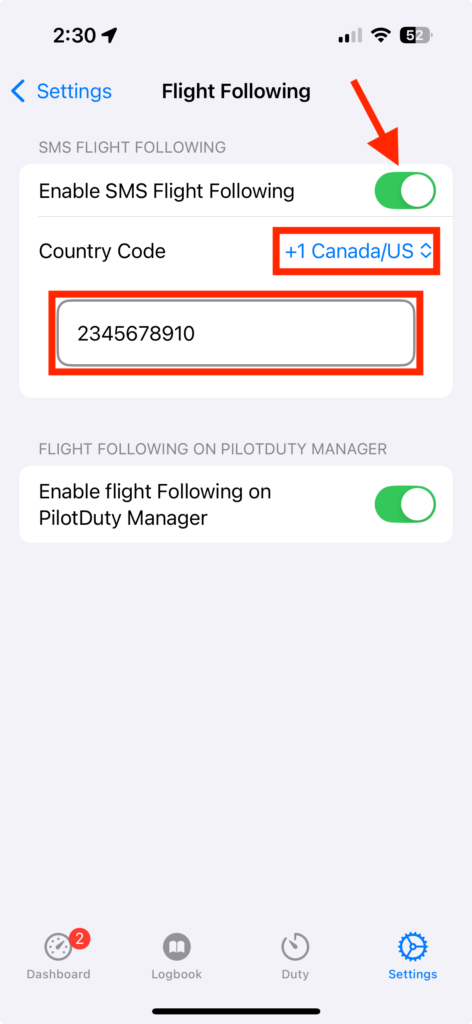
setting Flight Following With SMS Arrow

📌 SMS on Take Off Example :  John Dow took off from CYQB at 2025-02-28 10:42 GMT -5 with C-FFFF.

📌 SMS on Landing Example :  John Dow landed at CYBG at 2025-02-28 11:42 GMT -5 with C-FFFF.


🖥️ 2. PilotDuty Manager Flight Following #

PilotDuty Manager is a web-based dashboard that allows flight operators to follow multiple aircraft in real-time.

flightfollowing

How it works: #

When this option is enabled, the app automatically sends:

  • Flight status: (onBlock, takeoff, landing, low speed maneuver, offBlock)
  • Time of the event
  • Aircraft identification
  • Altitude and position

This data is shown live in the PilotDuty Manager interface with the status:

  • OnBoarding
  • In Flight
  • On Ground
  • Safe

This feature is perfect for operators managing multiple pilots or aircraft.

⚠️ Note: The PilotDuty application must be Signed In to PilotDuty Manager, see "Connect to PilotDuty Manager"

Setup Instructions: #

  1. Open the Settings tab in the app.
  2. Tap Flight Following.
  3. Enable Flight Following on PilotDuty Manager.
setting Flight Following With PDM Arrow

✅ Tips and Notes #

  • Both SMS and Manager modes can be enabled at the same time.
  • Make sure location permissions are set to Always and notifications are enabled.
  • Make sure the aircraft call sign is capitalized, complete and identical on the PilotDuty app and PilotDuty Manager
  • If the device loses signal during flight, data will be sent as soon as the connection is reestablished, if an error occurs, a notification will be displayed to the user.

🔐 Privacy & Safety #

  • No personal information is shared publicly.
  • All data sent to PilotDuty Manager is encrypted and secured.

Flight Following is designed to enhance your operational safety and peace of mind, whether you’re flying solo or as part of a team.

What are your Feelings

Share This Article :

  • Facebook
  • LinkedIn
Still stuck? How can we help?

How can we help?

Updated on March 30, 2025
Set the Parking Time LimitConnect to PilotDuty Manager

Leave a Reply Cancel reply

Your email address will not be published. Required fields are marked *

Table of Contents
  • 💬 1. SMS Flight Following
    • How it works:
    • Setup Instructions:
  • 🖥️ 2. PilotDuty Manager Flight Following
    • How it works:
    • Setup Instructions:
  • ✅ Tips and Notes
  • 🔐 Privacy & Safety

ABOUT PilotDuty


PilotDuty® is the only fully automatic flight logbook for general aviation pilots — featuring iBeacon-based flight tracking, SMS flight following, and aircraft maintenance monitoring. Trusted by aviation professionals across North America.

QUICK LINKS

  • PilotDuty – App
  • PilotDuty Manager
  • Contact Us
  • Shop

CONTACT US

Feel free to contact & reach us !

Address : Mascouche, Qc Canada
Email : support@pilotduty.com
Phone : 1 (888) 969-2594

RESOURCES

  • FAQ
  • Docs
  • Blog
  • Terms Of Use
  • Privacy Policy
  • Refund and Returns Policy
  • Cookie Policy
Copyright © 2026 PilotDuty. Powered by M2D3V