
🚀 Overview #
The Parking Time Limit is designed to avoid splitting a flight into multiple entries during short stops or touch-and-go maneuvers. It ensures that PilotDuty continues logging a single flight when the aircraft is briefly parked and quickly airborne again.
🔧 What is Parking Time Limit? #
The Parking Time Limit is a time threshold (in seconds) set by the user. It defines how long an aircraft can stay stopped before PilotDuty decides to end the current flight and start a new one.
• If the aircraft is parked less than the Parking Time Limit, the current flight continues.
• If the aircraft is parked longer than the Parking Time Limit, a new flight is created.
📌 Example: A parking time of 30 seconds means any stop shorter than that will not create a new flight.

In this example, the aircraft lands, briefly stops, and takes off again. If the stop duration is under the Parking Time Limit, it’s treated as one flight.
⚙️ How to Set the Parking Time Limit #
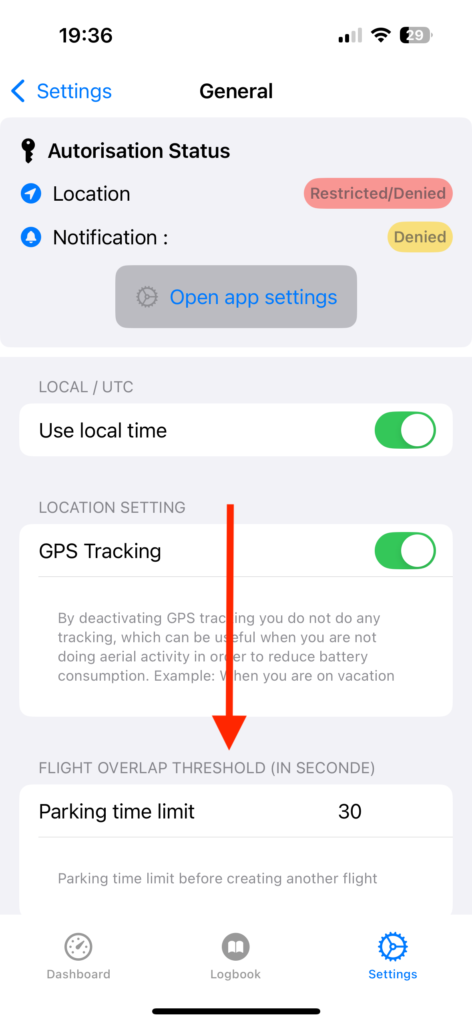
- Tap the Settings tab in PilotDuty.
- Go to General.
- Scroll down to Flight Overlap Threshold (in seconds).
- Enter your desired Parking Time Limit value.
✅ Best Practices #
• For training circuits or touch-and-go exercises, increase the limit (e.g. 60 seconds).
• For commercial ops, keep the default (e.g. 30 seconds) to clearly separate flights.
📌 Note (PRO)
📚 Summary #
Parking Time Limit gives you better control over how flights are logged during quick stops. Adjust it to match your flight activity and reduce the need for manual corrections in your logbook.

