Skip to content
  • PilotDuty – App
  • PilotDuty Manager
  • Resources
    • Features
    • Blog
    • docs
    • FAQ
    • Terms Of Use
    • Privacy Policy
    • Cookie Policy
  • Shop
    • Shop
    • Cart
    • My account
  • Contact

Archives

  • June 2025
  • May 2025
  • March 2025

Categories

  • Application
  • Case Study
  • Technology

How can we help you?

🚀 Getting Started with PilotDuty Manager

  • Initial configuration (OnBoarding)

🔧 Setup Process of PilotDuty Manager

  • Edit User Profile
  • Edit organization profile
  • Add an Aircraft
  • Manage Organization Members
  • Manage Workshops
  • Manage Subscription

👨‍💻 Use of PilotDuty Manager

  • Creating Events and Flights in PilotDuty Manager
  • Start a New Inspection Process
  • Complete the pending inspection
  • Flight Following on PilotDuty Manager
View Categories
  • Home
  • Docs
  • PilotDuty Manager
  • 👨‍💻 Use of PilotDuty Manager
  • Start a New Inspection Process

Start a New Inspection Process

2 min read

To effectively Start a New Inspection Process, ensure your aircraft remains compliant and safely maintained by creating and logging inspections directly from the Aircraft section.

Go to aircraft tab, select an aircraft and click Start Inspection next to the desired schedule (e.g., 50-Hour or 100-Hour/Annual).


🧭 Overview and Inspection Selection #

The inspection interface shows:

  • Last inspection
  • Upcoming scheduled inspections
  • List of task with their statuses (Timed, Dated and Cycled)

Click Start Inspection to launch the inspection process.
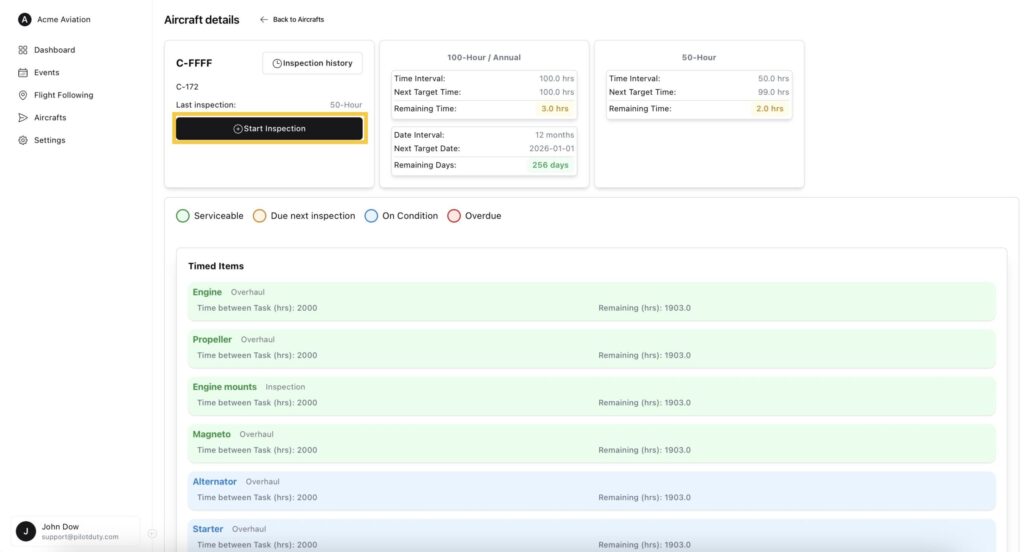
Start a New Inspection Process

✅ Step 1 — Confirmation of Pre-Check #

Pilotduty Manager calculates the most efficient upcoming inspection schedule for you, but you can choose the one of your choice. You can also opt for ‘Custom Task’ in case you want to produce a work order for specific tasks outside of an inspection process. e.g.: Altimeter recertification, transponder recertification, ELT recertification…

You’ll be asked to confirm:

  • Inspection type
  • Inspection date
  • That all required documentation has been reviewed (ADs, SDRs, etc.)

Click Next to proceed.
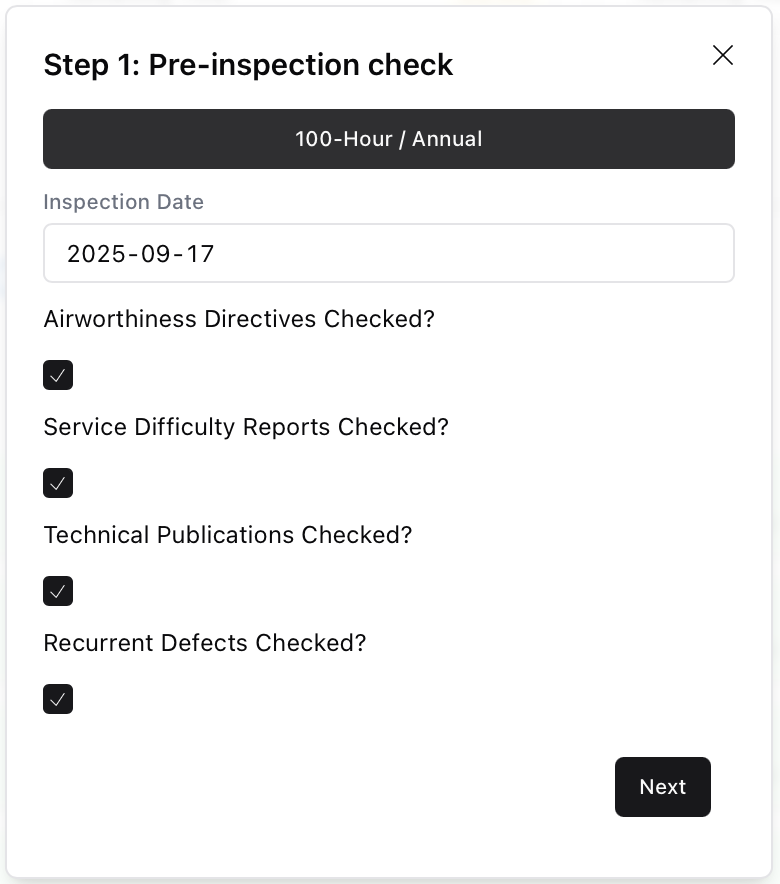
Inspection Step 1

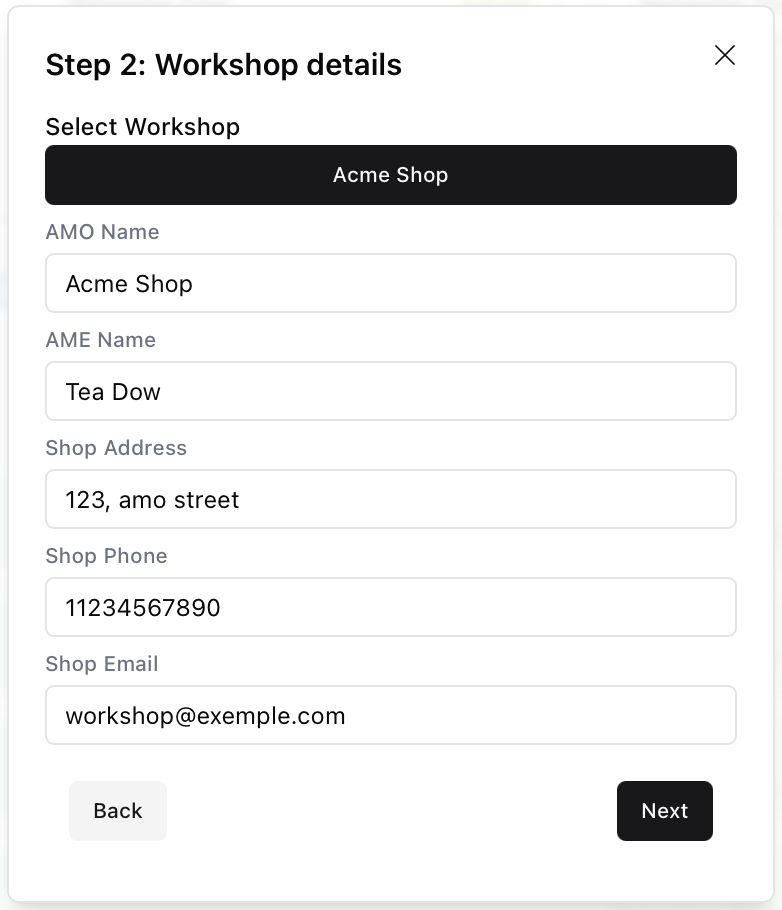
🧾 Step 2 — Workshop Information #

Fill in the details of the maintenance provider:

  • AMO/AME Name
  • Contact information
  • Address of the workshop

These fields may be prefilled if the workshop is already registered.
Inspection Step 2

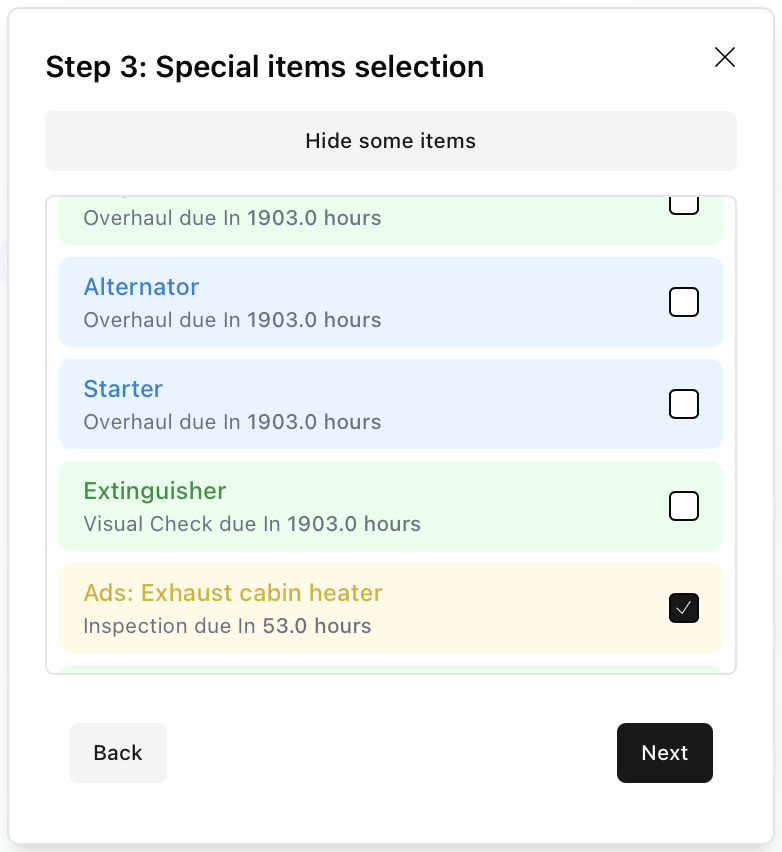
🧰 Step 3 — Task Selection #

You can select individual timed, dated, or cycled items that were also completed during this inspection.

This allows you to update multiple task logs in a single submission.
Inspection Step 3

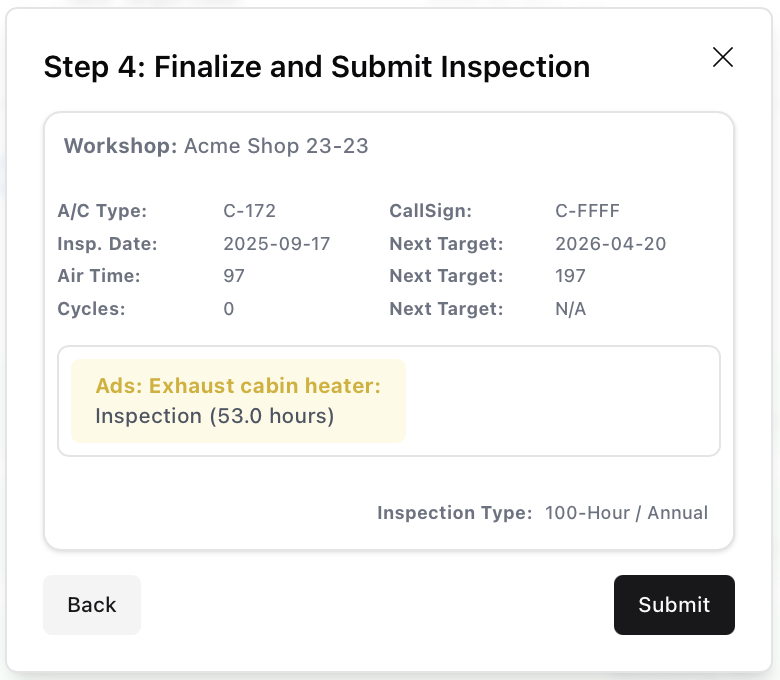
📝 Step 4 — Review and Submit #

A full summary is shown:

  • Aircraft details
  • Inspection type
  • Tasks selected for update

Click Submit to log the inspection and update all related tracking data.
Inspection Step 4

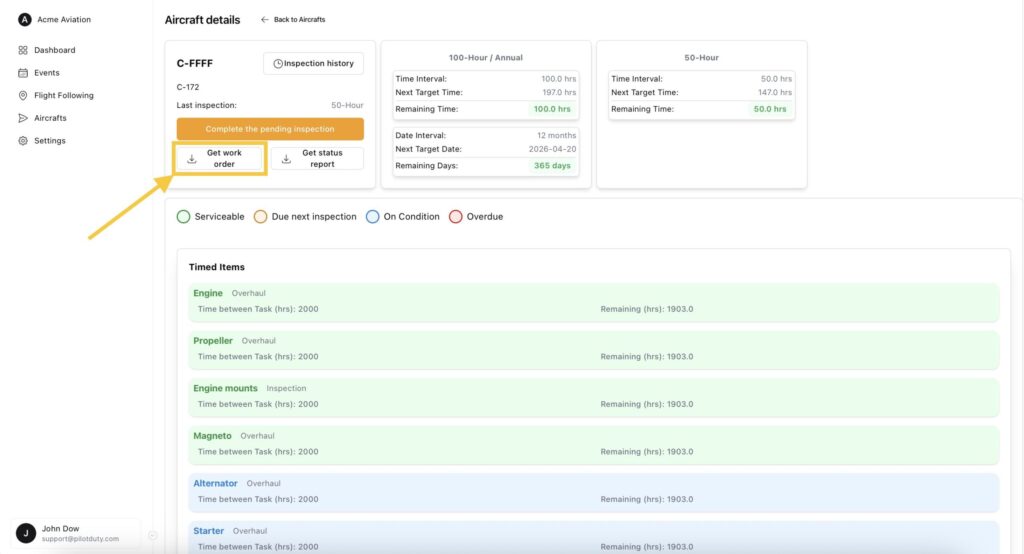
Get Work order #

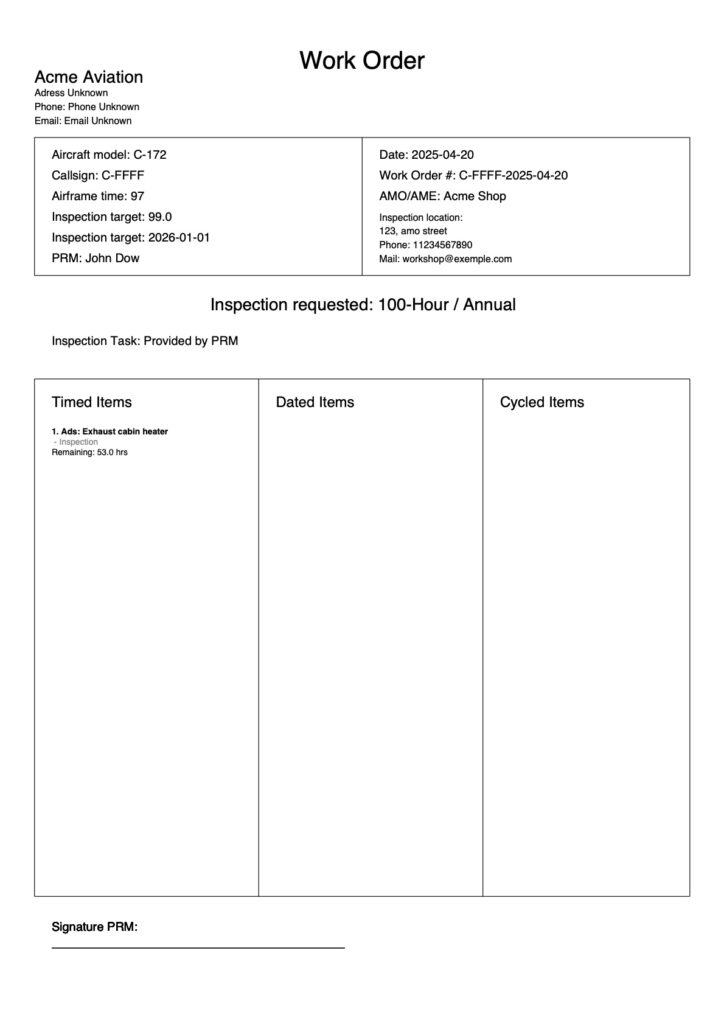
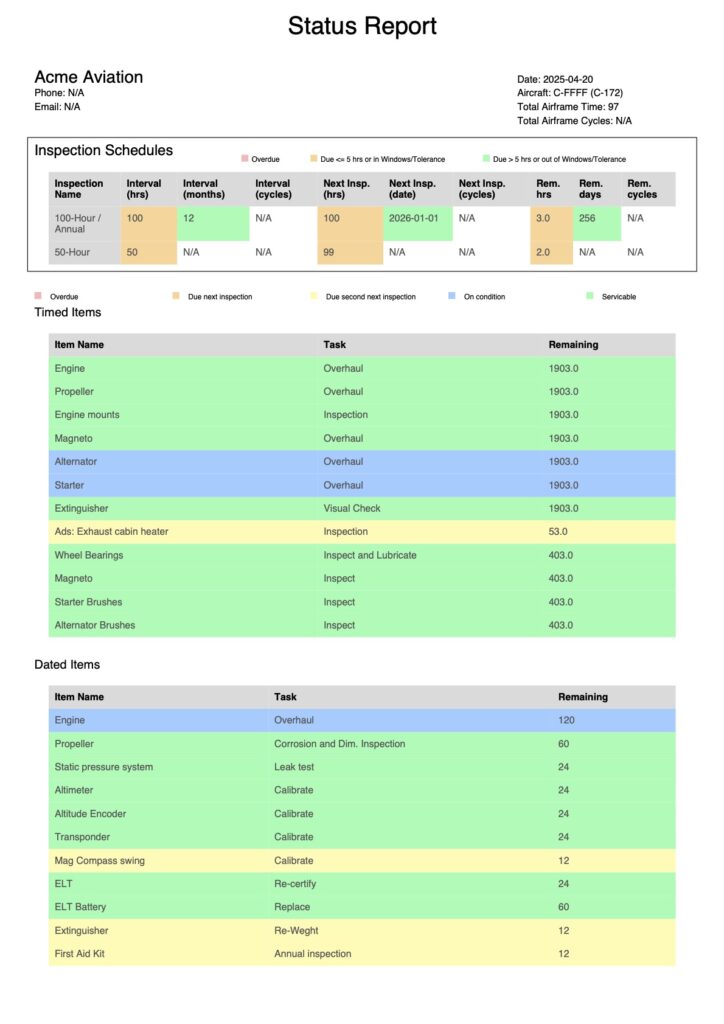
Once the inspection process is completed, 2 new buttons appear: “Work Order” and “Status Report”.

Click on Get work order
Aircraft Pending Inspection Work Order
workOrder C FFFF 2025 04 20

Get Status Report #

Once the inspection process is completed, 2 new buttons appear: “Work Order” and “Status Report”.

Click on Get status report
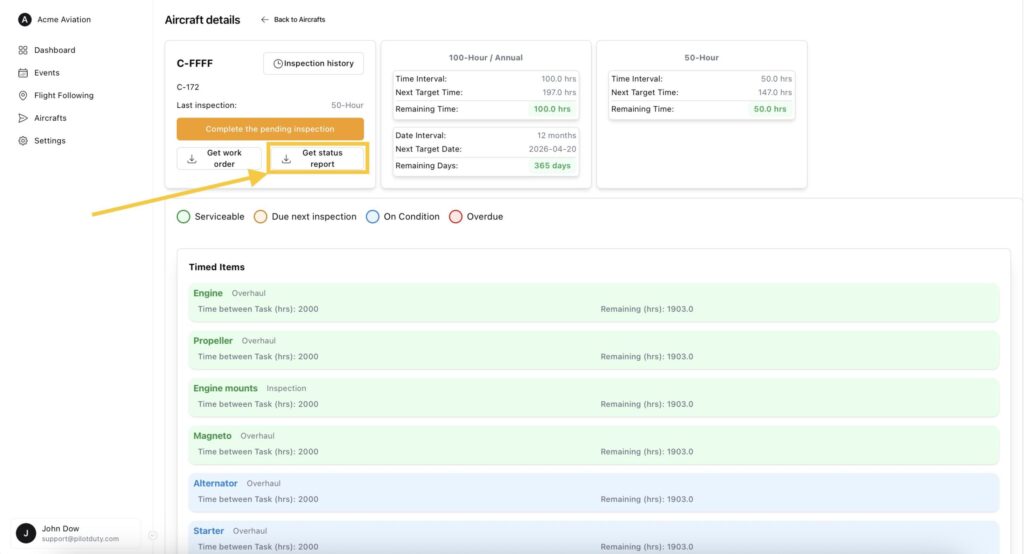
Aircraft Pending Inspection Status Report
statusReport C FFFF 2025 04 20

Next step after inspection is completed

Go to documentation
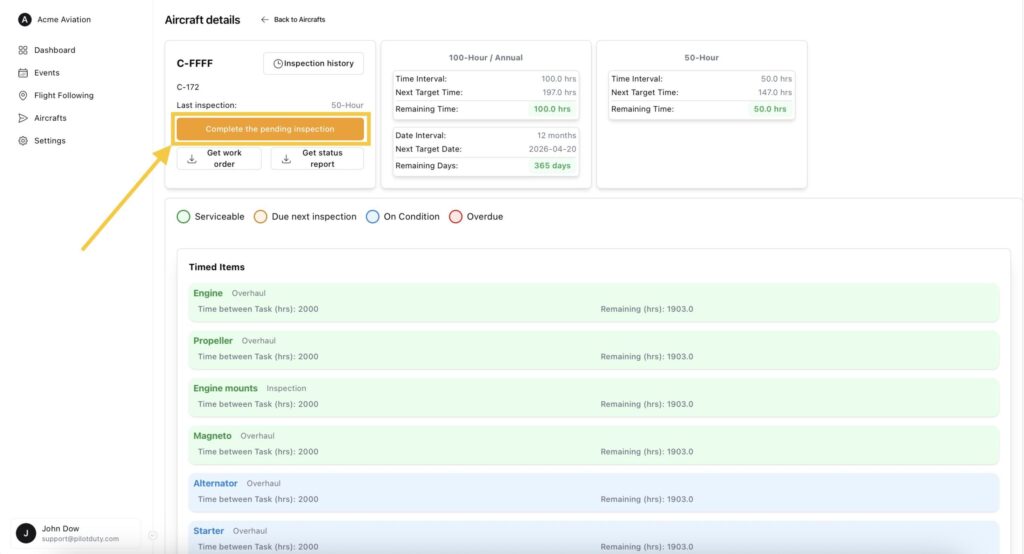
Complete the pending inspection
Aircraft Pending Inspection
What are your Feelings

Share This Article :

  • Facebook
  • LinkedIn
Still stuck? How can we help?

How can we help?

Updated on June 12, 2025
Creating Events and Flights in PilotDuty ManagerComplete the pending inspection

Leave a Reply Cancel reply

Your email address will not be published. Required fields are marked *

Table of Contents
  • 🧭 Overview and Inspection Selection
  • ✅ Step 1 — Confirmation of Pre-Check
  • 🧾 Step 2 — Workshop Information
  • 🧰 Step 3 — Task Selection
  • 📝 Step 4 — Review and Submit
  • Get Work order
  • Get Status Report

ABOUT PilotDuty


PilotDuty® is the only fully automatic flight logbook for general aviation pilots — featuring iBeacon-based flight tracking, SMS flight following, and aircraft maintenance monitoring. Trusted by aviation professionals across North America.

QUICK LINKS

  • PilotDuty – App
  • PilotDuty Manager
  • Contact Us
  • Shop

CONTACT US

Feel free to contact & reach us !

Address : Mascouche, Qc Canada
Email : support@pilotduty.com
Phone : 1 (888) 969-2594

RESOURCES

  • FAQ
  • Docs
  • Blog
  • Terms Of Use
  • Privacy Policy
  • Refund and Returns Policy
  • Cookie Policy
Copyright © 2026 PilotDuty. Powered by M2D3V