Skip to content
  • PilotDuty – App
  • PilotDuty Manager
  • Resources
    • Features
    • Blog
    • docs
    • FAQ
    • Terms Of Use
    • Privacy Policy
    • Cookie Policy
  • Shop
    • Shop
    • Cart
    • My account
  • Contact

Archives

  • June 2025
  • May 2025
  • March 2025

Categories

  • Application
  • Case Study
  • Technology

How can we help you?

🚀 Getting Started with PilotDuty Manager

  • Initial configuration (OnBoarding)

🔧 Setup Process of PilotDuty Manager

  • Edit User Profile
  • Edit organization profile
  • Add an Aircraft
  • Manage Organization Members
  • Manage Workshops
  • Manage Subscription

👨‍💻 Use of PilotDuty Manager

  • Creating Events and Flights in PilotDuty Manager
  • Start a New Inspection Process
  • Complete the pending inspection
  • Flight Following on PilotDuty Manager
View Categories
  • Home
  • Docs
  • PilotDuty Manager
  • 👨‍💻 Use of PilotDuty Manager
  • Complete the pending inspection

Complete the pending inspection

< 1 min read

Once your AMO has completed the inspection physically, follow these steps to finalize it in PilotDuty Manager and store the required documentation.


✅ Step 1 – Open the inspection completion modal #

From the aircraft details page, click the orange button labeled:

“Complete the pending inspection”

This action is only available if an inspection was previously started but not finalized.
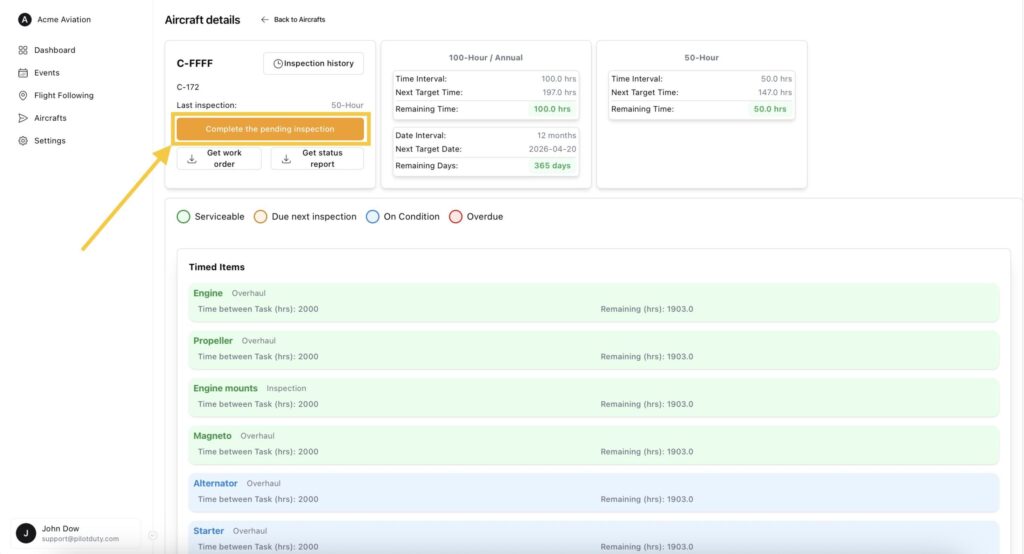
Aircraft Pending Inspection

📁 Step 2 – Upload the required documents #

In the modal that appears:

Check the “Technical Log Checked?” checkbox if applicable

(Optionally) Upload the following three files provided by your AMO:

  • Work Report
  • Inspection Task File
  • Quality Control Report

Confirm the completion of each item task

📦 Step 3 – Finalize and store #

Click “Complete Inspection” to:

Allow generation of the Alert Card

Save the inspection to the aircraft’s history

Update all due time counters (air time, cycles, etc.)
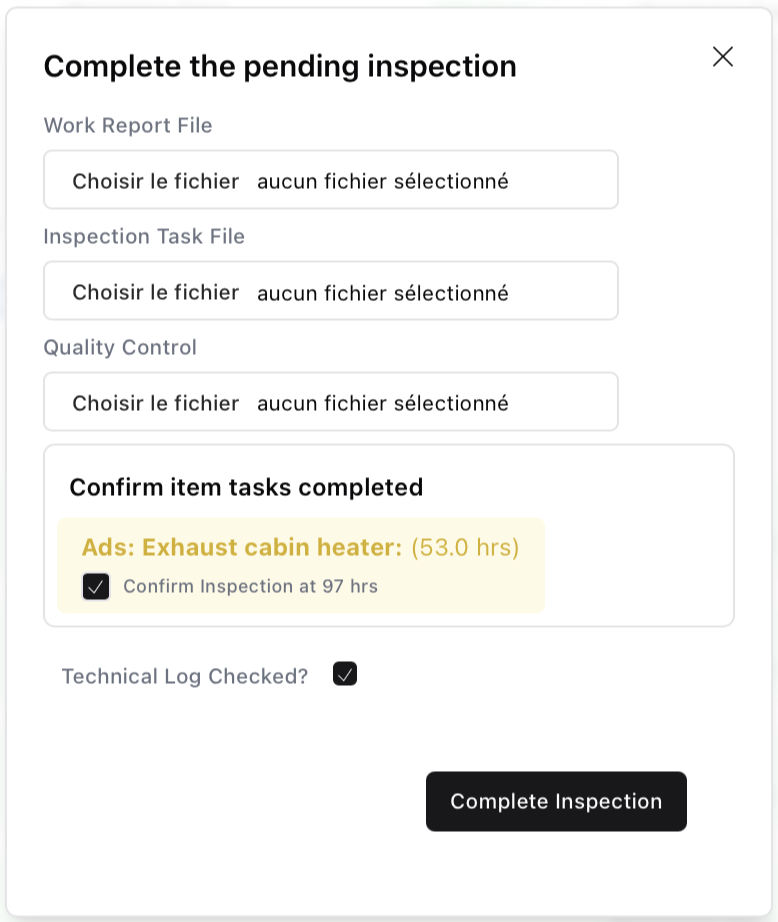
Inspection Pendin Modal

🔔 Get latest alert card #

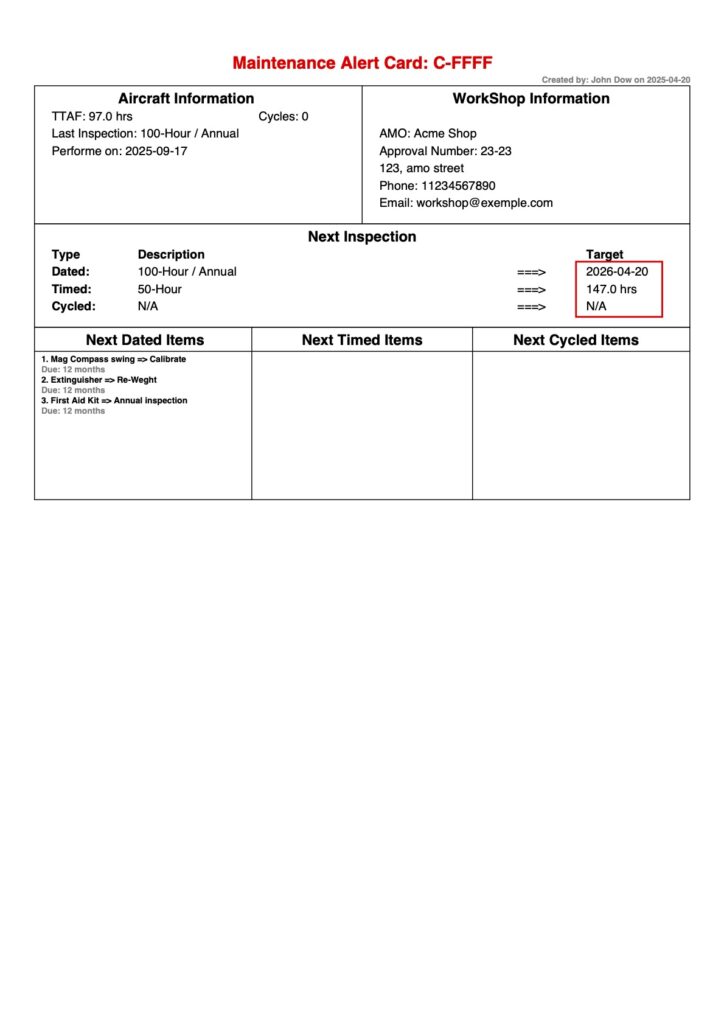
You can now click “Get latest alert card” to download .
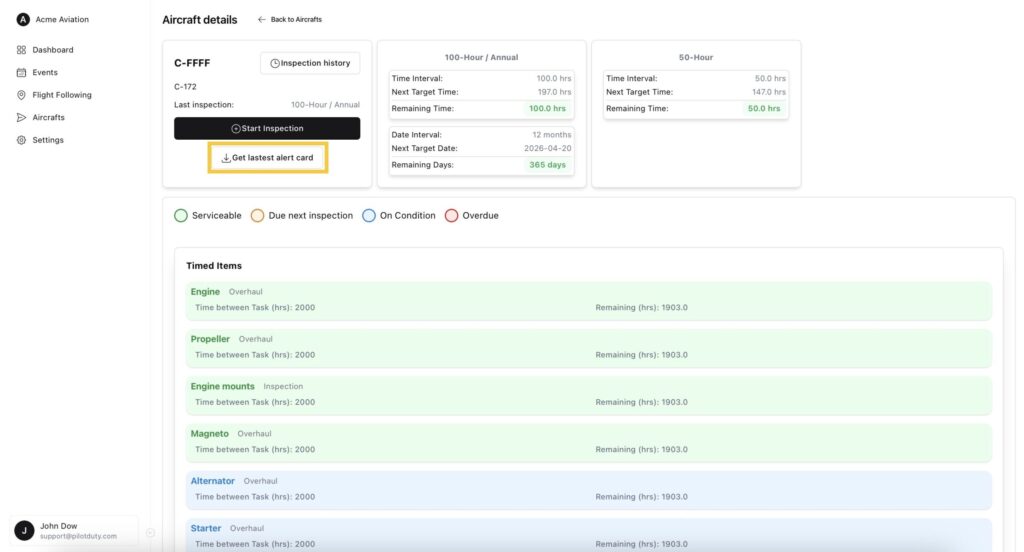
Aircraft Inspection With Alert Card
alertCard C FFFF 2025 09 17
What are your Feelings

Share This Article :

  • Facebook
  • LinkedIn
Still stuck? How can we help?

How can we help?

Updated on June 12, 2025
Start a New Inspection ProcessFlight Following on PilotDuty Manager

Leave a Reply Cancel reply

Your email address will not be published. Required fields are marked *

Table of Contents
  • ✅ Step 1 – Open the inspection completion modal
  • 📁 Step 2 – Upload the required documents
  • 📦 Step 3 – Finalize and store
  • 🔔 Get latest alert card

ABOUT PilotDuty


PilotDuty® is the only fully automatic flight logbook for general aviation pilots — featuring iBeacon-based flight tracking, SMS flight following, and aircraft maintenance monitoring. Trusted by aviation professionals across North America.

QUICK LINKS

  • PilotDuty – App
  • PilotDuty Manager
  • Contact Us
  • Shop

CONTACT US

Feel free to contact & reach us !

Address : Mascouche, Qc Canada
Email : support@pilotduty.com
Phone : 1 (888) 969-2594

RESOURCES

  • FAQ
  • Docs
  • Blog
  • Terms Of Use
  • Privacy Policy
  • Refund and Returns Policy
  • Cookie Policy
Copyright © 2026 PilotDuty. Powered by M2D3V